IArsenal Web · For a team
What one learns,
the whole team knows.
Everyone has their own IArsenal Web, connected to everything. The team shares the same know-how, memories and tasks, securely.
- Hosted in Québec
- Works with your AI subscription
- Ready with no installation
The problem
Everyone has their own AI,
each in their own corner.
Today
- A good way of doing things stays with whoever found it.
- People repeat themselves, send messages around, lose tasks.
- Nobody knows what the other person's AI knows.
With IArsenal Web
- What one member shows their assistant serves the whole team.
- Tasks are in one place, and everyone sees where they stand.
- Everyone keeps their own space, securely.
IArsenal Web vs. a regular AI
A regular AI answers you.
IArsenal Web does the work.
| Feature | Regular AI | IArsenal Web |
|---|---|---|
| Chat with the AI | ||
| Your AI subscription, no extra API fees | ||
| Your own space, on day and night, hosted in Québec | ||
| Reaches your machines over a private network and works on them | ||
| An AI team that splits up the work | ||
| Connects to your local open-source AI, and to other AIs like OpenAI or Gemini | ||
| Your know-how shared with others, securely |
A regular AI: the AI app, as is.
Working together
The same know-how,
the same tasks.
- 01
The same know-how for everyone
The team's know-how, memories and assistants reach everyone, always up to date, and nobody can quietly change them.
- 02
Tasks that don't get lost
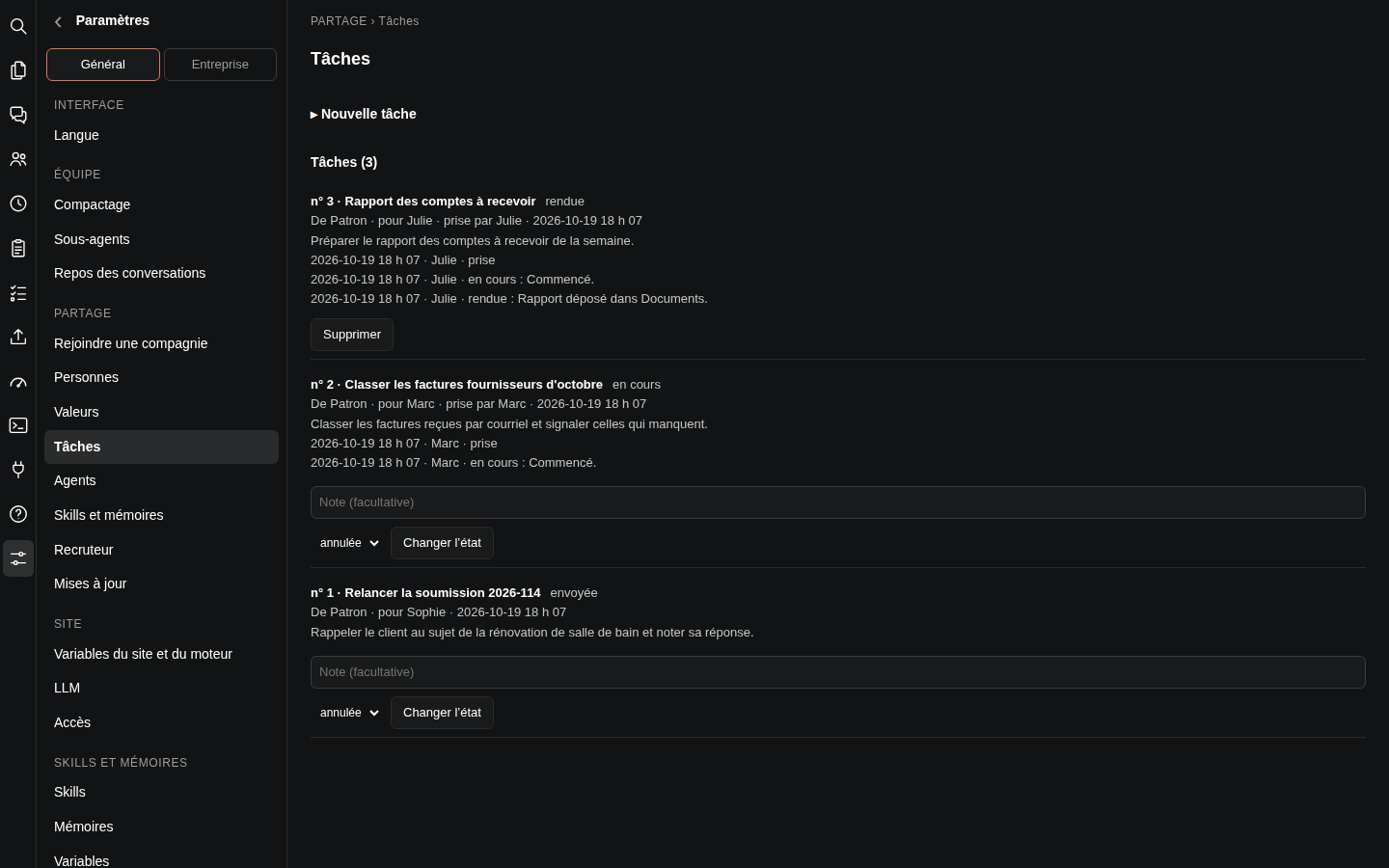
Someone sends a task, someone takes it, and everyone sees where it stands, from sent to done.
- 03
Shared info in one place
Addresses, settings, ways of working: anyone can propose a change, and the lead decides.
- 04
Sub-groups
By project or by client: each person only receives what concerns them.
- 05
Securely
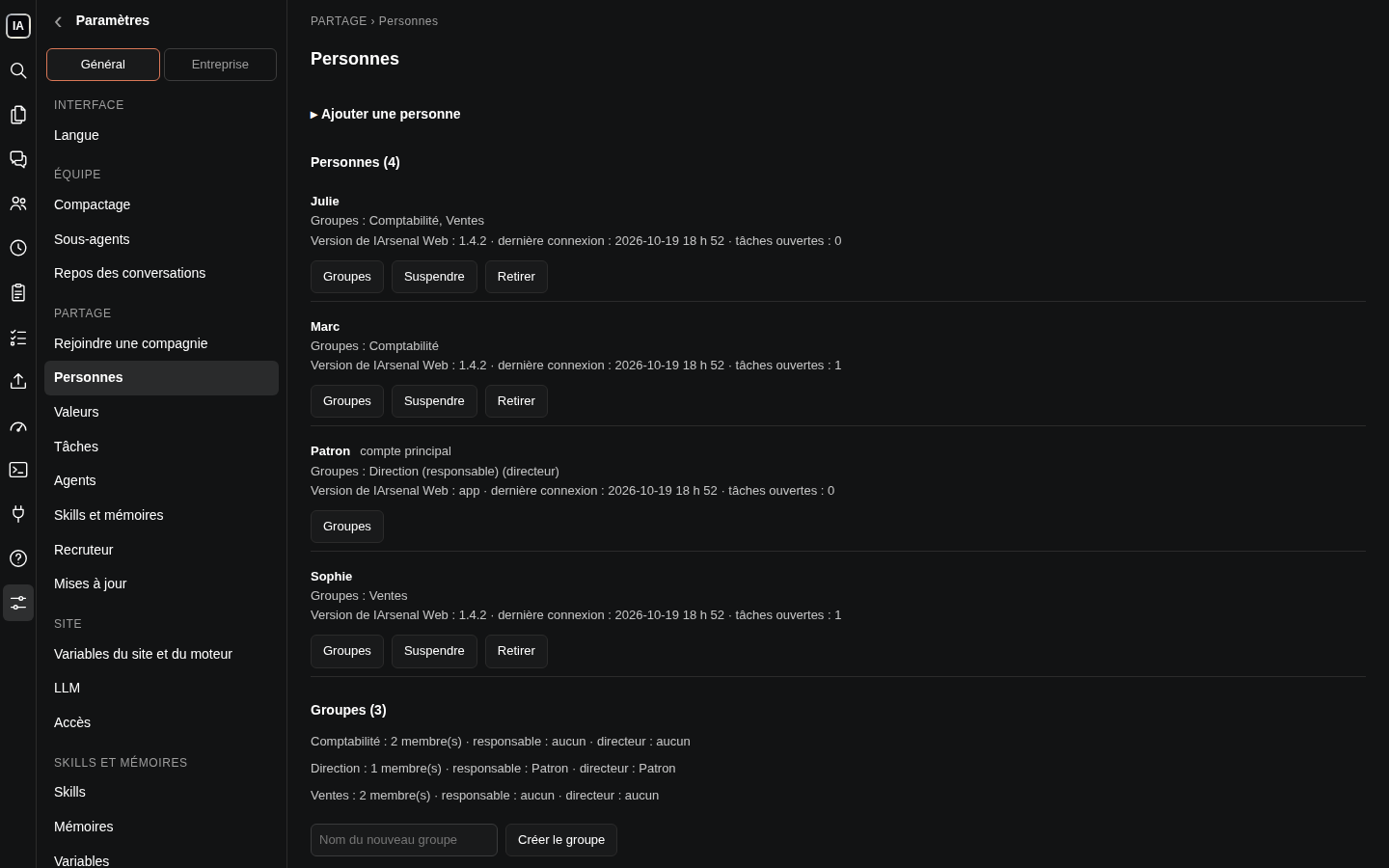
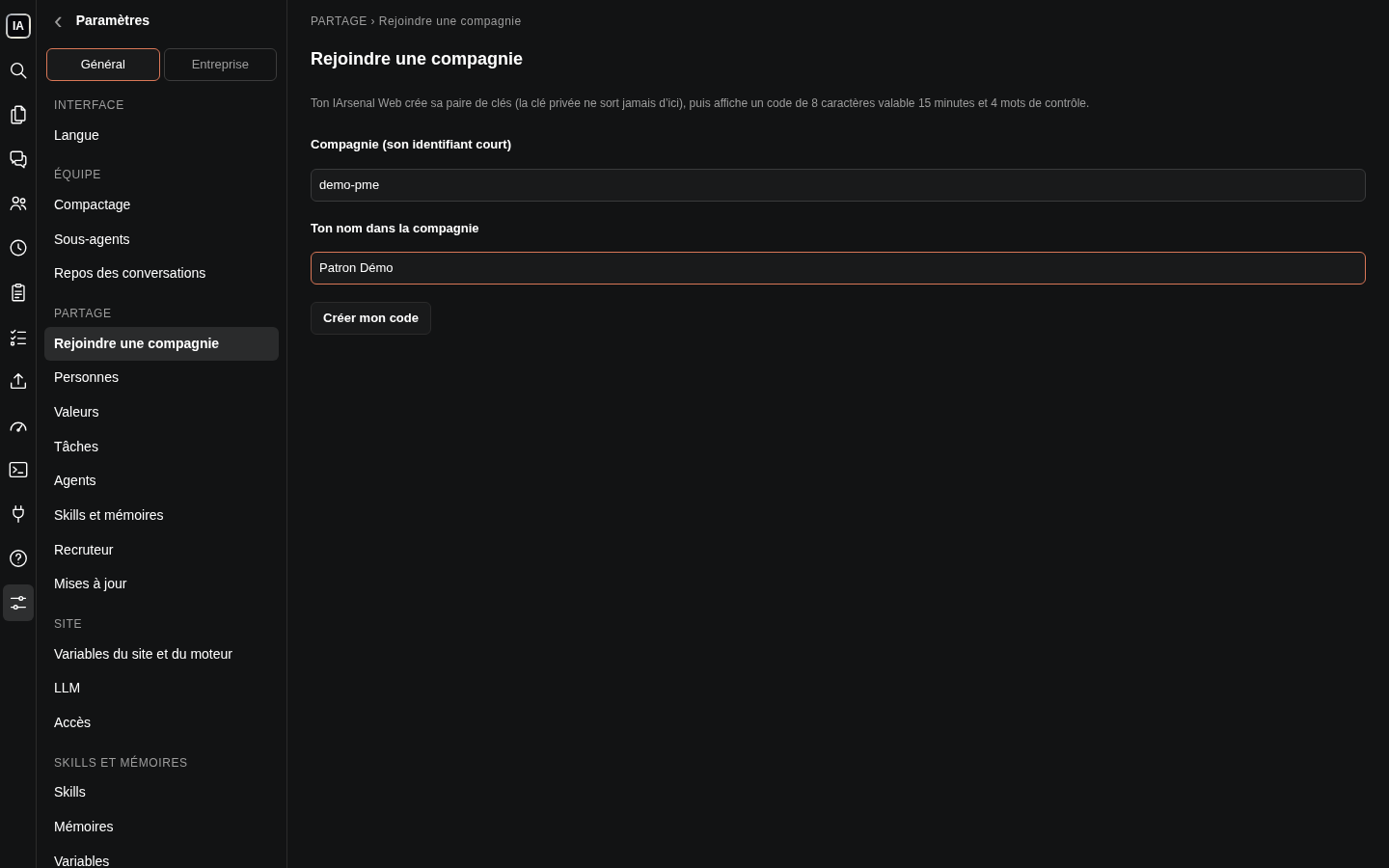
People join by invitation, with a code and 4 words. Exchanges are encrypted, a check runs before every share, and everyone keeps their space closed.
- 06
Simple to start
One person opens the team and invites the others. Someone leaves? Their access is cut.
Sign-up opens soon. Be among the first to try it.
And for every member
Connected to everything.
It does the real work.
It takes over your computer
It sees the screen, moves the mouse, types, installs and fixes your Windows computer, even remotely.
It reaches all your machines
Over a private network, it connects to your computers and servers, wherever they are. It checks, installs and repairs.
It works on its own, day and night
On the schedule you set: every minute, every Monday at 7 a.m., the first of the month. Even with your computer off. If a site or service goes down, it warns you.
It does the real work
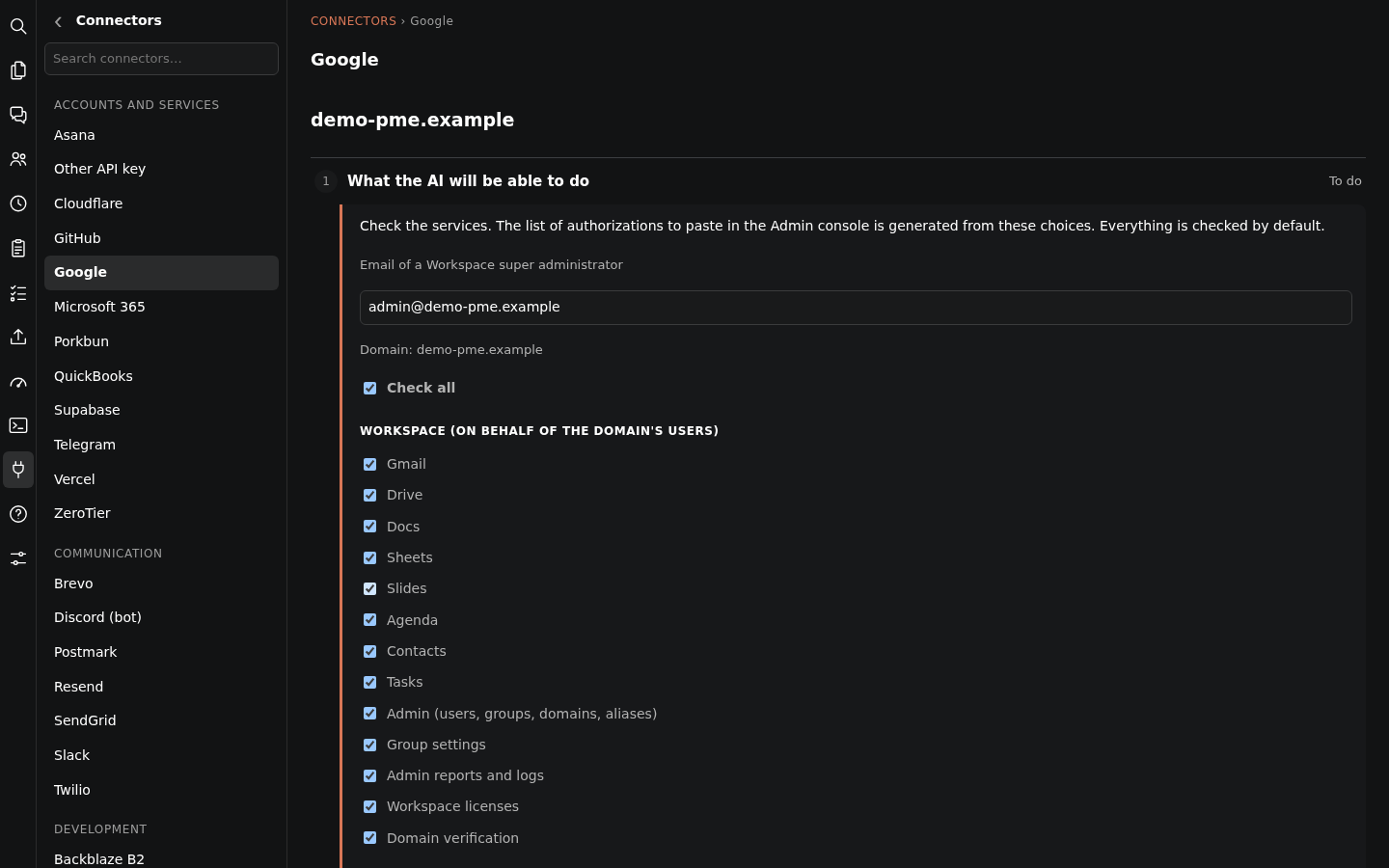
It records, files, publishes and sends right in your accounts: Google, Microsoft, QuickBooks and more than 50 services.
It learns and doesn't forget
Your ways of working become its know-how, your decisions become its memories. You read and correct them whenever you want.
It talks and listens *
Talk to it out loud and it answers. Your meetings are transcribed, with who said what. * With a local AI model.
Connects to your local open-source AI
It connects to the open-source AI running at your place, like Llama, Mistral or Qwen: your data stays in. When needed, OpenAI or Gemini too.
A real workstation
A real terminal and your files in the page: it runs commands, processes data and prepares documents.
AI teamwork
Several AIs at work,
at the same time, for you.
Give it a big project: it splits it up, runs it on several fronts at once, has it checked, and only bothers you with the real questions.
- 01
You hand over the project
You name a Director and explain the project in your own words. It splits it into workstreams and shows you the plan before starting.
- 02
Several workstreams in parallel
Each workstream has its Manager, who runs helpers at the same time. The work moves forward on several fronts at once.
- 03
They talk to each other
Each one hands in its work with a status: ready, blocked or a question. Whoever is waiting for an answer is woken up automatically.
- 04
Everything gets checked
Before telling you it's done, others check it as a group, with proof.
- 05
You only get the questions
What needs your input arrives in a report with buttons. The rest moves on without you.
- 06
It never loses the thread
When a conversation gets too long, a relay takes over with everything done so far.
All features
Everything is there, in a single page.
Conversations
- One conversation per tab, several at once, grouped in tab groups
- Write while it works, or stop it right away
- Choose the model, the thinking and the permission mode
- See its thinking, its task list and what it hands to its Workers
- Plans to review, edit, accept or reject
- Search across every conversation and file
Sharing and team
- Invite someone with a code and 4 words
- Groups of people, by team or project
- Know-how, memories and assistants shared read-only
- Shared tasks: send, take, follow
- Shared values, with change proposals
- Suspend or remove someone
Your assistants
- Create an assistant in a few clicks, one per subject
- Its instructions, like a job description
- Its tools, its know-how and its own settings
- Scheduled routines: create, pause, run now
- Read and fix what it knows and what it remembers
Files and machines
- File explorer and editor in the page
- Terminal in the browser, nothing to install
- Access to your machines over a private network
- Taking over a Windows computer: screen, mouse, keyboard
- Attach a file or a screenshot to a message
Connections
- Google Workspace: the whole company at once, or one account
- Microsoft 365: the whole company, or a personal account
- QuickBooks, Stripe, HubSpot, Slack and more than 40 services
- Every connection checked every night
- Connection to your local open-source AI, or to OpenAI, Gemini, Mistral
Account and comfort
- Your AI subscription, or an API key
- Password, 6-digit code, trusted device
- Voice, on computer and phone (with a local AI model)
- French, English, Spanish
- Updates at night, without cutting off any work
Questions
Your questions, answered.
Who sees what? +
Everyone has their own space, closed to others. What the team shares reaches each person read-only, and nothing private leaves.
How do we start? +
One person opens the team and invites the others with a code and 4 words, no shared password.
What if someone leaves the team? +
Their access is suspended or removed. Shared items stop reaching them.
Do I need an AI subscription? +
Yes. IArsenal Web works with your artificial intelligence subscription, with no extra API fees. An API key works too.
Do I need to install anything? +
No. IArsenal Web is ready: you open it in your browser, on computer or phone, and it installs on the home screen like an app.
How is it different from a regular AI? +
A regular AI answers when you talk to it. IArsenal Web has its own space that stays on day and night, it is connected to your machines and accounts, and it works on its own, on the schedule you set.
How much does it cost? +
A team uses the business plan. The price will be shown when sign-up opens.
Sign-up
Sign up your team
to IArsenal Web.
Sign-up opens very soon. Be among the first to sign up and start in minutes, with nothing to install.
Works with your AI subscription. IArsenal Web is an IArsenal product, from Québec.